Posts
From 8 Hours to 47 minutes - 12 Proven AI Coding Strategies
December 3, 2025 • 11 min read
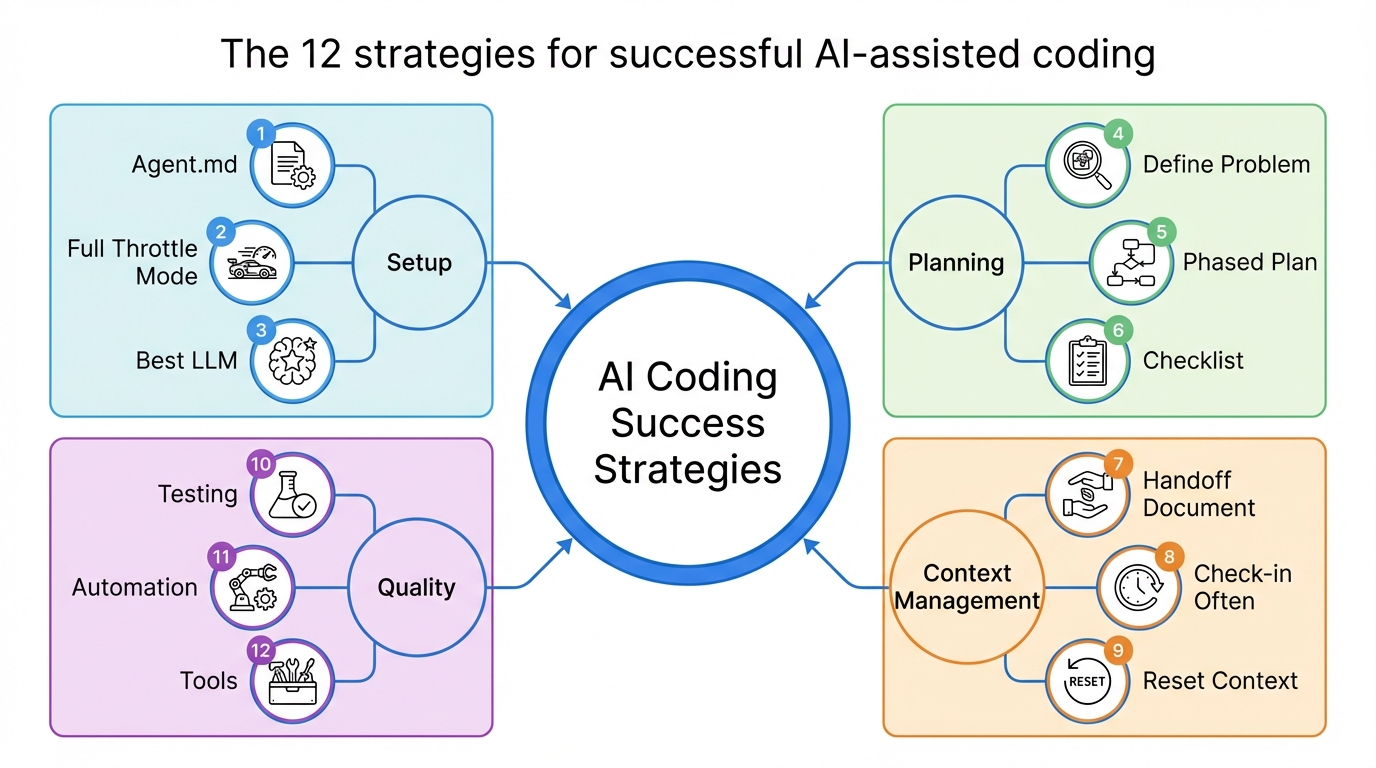
AI built a feature in 47 minutes, which would have taken 8 hours of work a few years ago. But here’s what nobody tells you: without the right strategies, that same AI will waste three hours building the wrong thing.
Hi, I’m Chuck, and I’ve been writing code for 30 years. In 2023, I realized I either needed to embrace AI or find a new career. I chose to embrace it. Since then, I’ve built a dozen applications using coding agents, and today I’m sharing every strategy learned with you.
AI changes everything, most notably, it speeds everything up. What took a day now takes an hour.
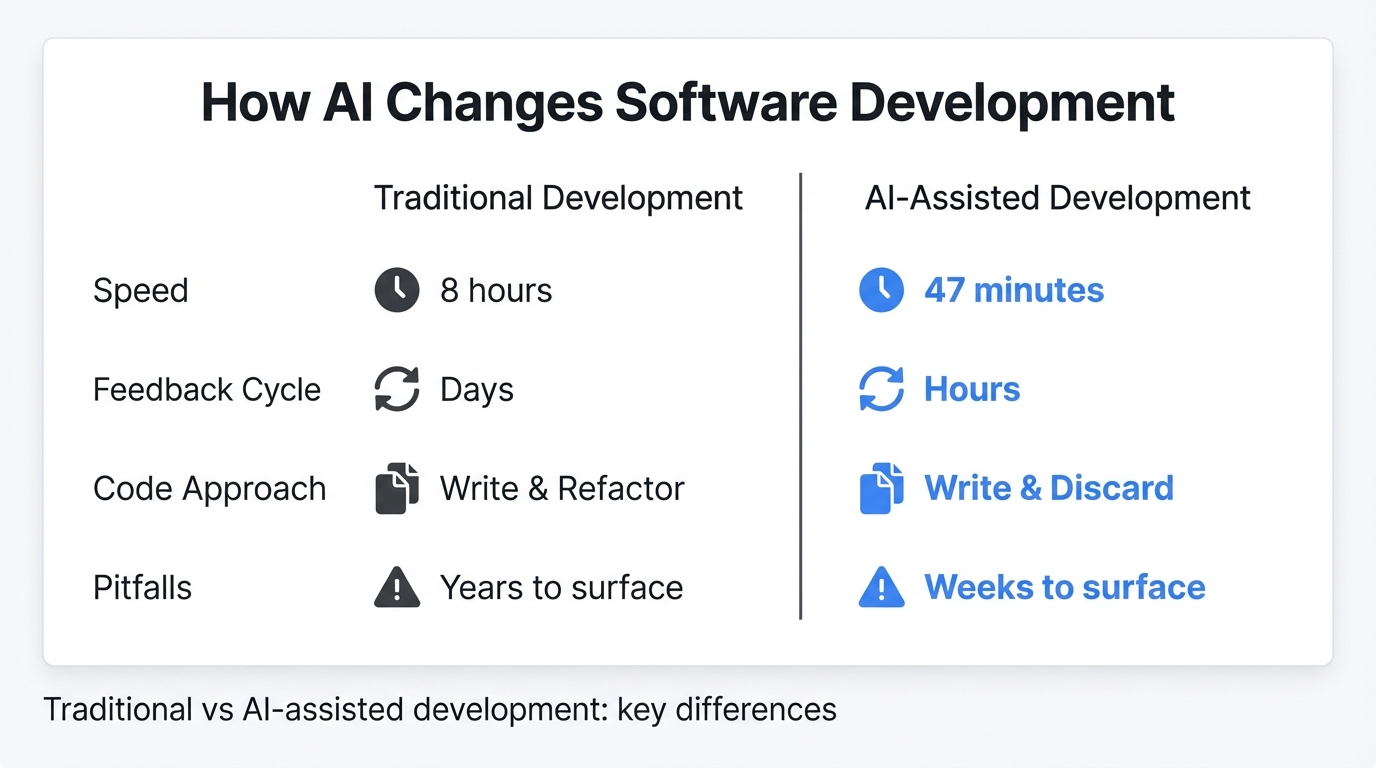
The speed means a few things:
First, your feedback cycle is much faster, errors and wrong directions surface faster, and getting to success surfaces faster.
Second, a lot of code is now throwaway. It’s cost-effective primarily to write and discard rather than to write and refactor.
Third, software development potholes that took years to run into now surface in weeks or months.
Fourth, without guidance, AI quickly goes off the rails and over the cliff.
In my time using coding agents like Cursor, I’ve discovered 12 strategies that help keep AI from going over the cliff. These were learned the hard way, by trial and error.
1. Use the Agent.md
One of the many things I noticed about LLMs is that they all want to add “fallbacks.”
Fallbacks are conditional code that executes when the first condition fails. This is great when your code is going to Mars, but most code isn’t going to Mars, certainly not mine. To make matters worse, Fallbacks are inherently buggy and aren’t needed most of the time.
This is where an Agent.md file comes in. You can instruct the LLM not to use fallbacks. In fact, you can tell it to do anything. Anything you would add to a prompt can be added to the Agent.md. The file is automatically added to each new context.
At the moment, each coding agent has their own agent.md file. Cursor calls their’s .cursorrules, Claude Code calls their’s claude.md. I suspect that in the near future, coding agents will standardize on a common name.
In my Agent.md I define the software patterns, the testing strategy, and the architecture I want to use. Anything I find the agent doing repeatedly due to a lack of context or direction, I add to the file.
Here’s a link to a repository of agent rules.
Once your Agent.md file is set up, you’ll want to use AI unhindered.
2. Going Full Throttle
Both Claude Code and Cursor AI start in a “safe mode” out of the box. Safe mode requires permission for each tool call. After a few minutes of approving EVERY tool call, I was done with safe mode.
Fortunately, each Coding Agent allows you to opt out of “safe mode”. The risk is that AI can go off and do undesirable things, but in the time I’ve used coding agents, I’ve never had it do anything irreversible.
I do keep an eye on what the LLM is doing, but I don’t feel comfortable walking away from the Coding Agent just yet.
Honestly, unless you’re asking the LLM to work on live production code, and I don’t know why you’d want safe mode.
Now that you’ve freed your coding agent, we need to define the problem.
3. Defining your problem.
AI is a literalist. You get what you ask for, which means vague prompts produce vague results.
I’ve found that providing AI with detailed requirements and asking for an “assessment” gets the best results. This allows AI to look for gaps in the design and respond with follow-up questions. After a couple of back-and-forths, you’ll have a solid plan.
In recent releases, both Cursor and Claude Code have added “Plan Mode,” which formalizes the above process.
I take it a step further and have another LLM review the plan. For example, I use ChatGPT for the first AI assessment. It generates a markdown doc with all the requirements. I then give that document to Claude for feedback, and Claude’s second review always finds missed gaps.
This is a taste thing, but AI tends to over-architect for me. Again, AI seems to think the code is on its way to Mars.
Once you’ve settled on a plan, ask AI to save it to a document in your project.
Which brings me to the next point.
4. Create a Phased Plan
 Breaking large features into manageable phases and tasks
After you’ve created a plan, ask AI to break the work up into phases. You want small units of work; the smaller the better. The smaller the unit, the higher the chance of success.
Some coding agents do this out of the box, but if they don’t ask them to.
The best plan will still fail if you can’t track progress. This is where checklists come in.
5. Ask for a Checklist
Ask AI for a checklist and tell it you need one to track progress. Many of the coding agents have added the checklist to the agent prompt and ui, but sometimes I still need a checklist to track progress or track long-running work.
The checklist also gives AI something to measure itself against, so it knows when it’s done.
Checklists are great, but how do we span contexts with checklists? This is where our handoff document comes in.
6. Create a Handoff Document
What is a handoff document?
A handoff document is a high-level description of the application. Its purpose is to bring an empty context up to speed on your application’s domain, code, and architecture.
Ideally, the agent picks up in stride, where the previous context left off.
In my Agents.MD, I instruct the agent to update my handoff document with high-level changes. What we don’t want is every detail in the document; I need a high-level summary, and I let AI determine what is.
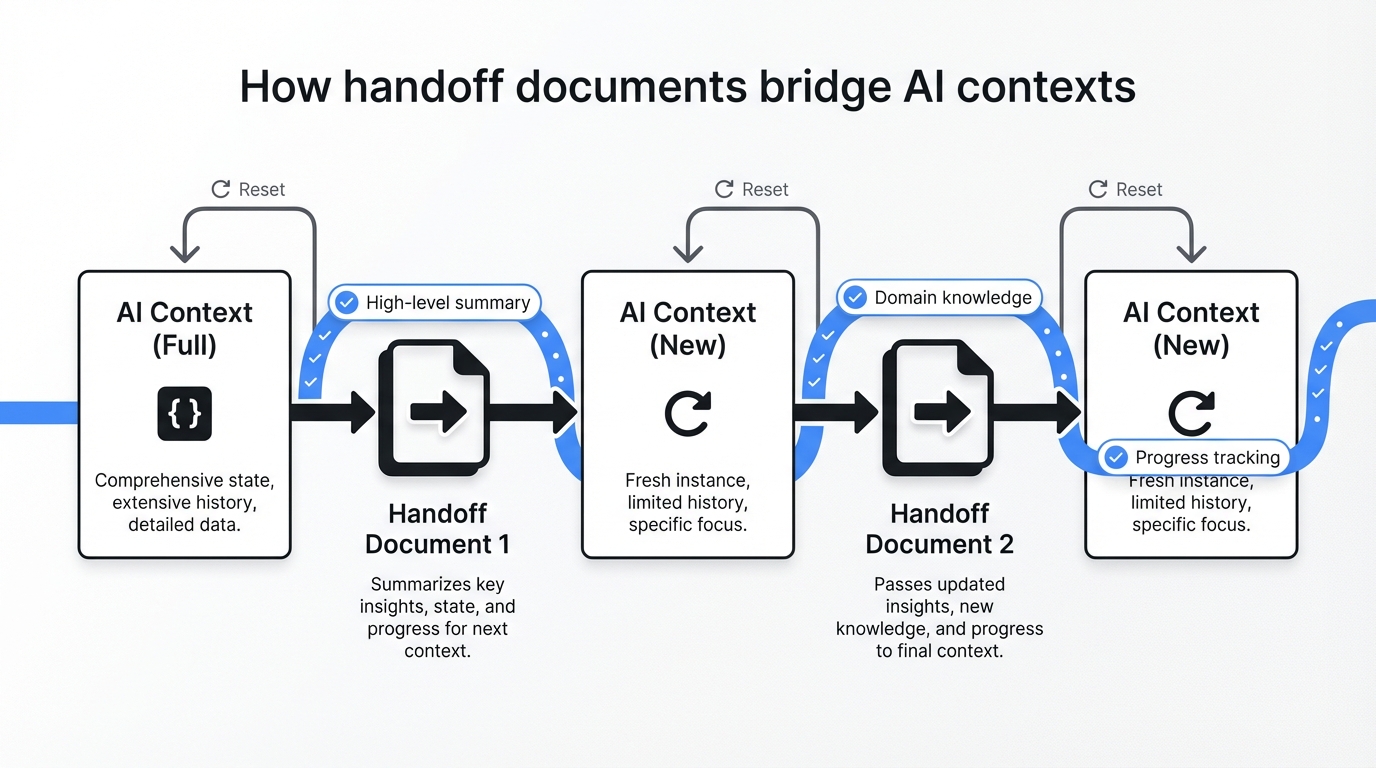
My workflow goes a bit like this:
Each time I started a new context, I included my handoff document and instructed AI on the new feature. AI picks up the task and begins working like it’s been on the project for 6 months.
The handoff document is great for smaller applications, but in larger applications, it consumes too many tokens and isn’t practical. I’m considering other options, such as a vector database or a graph database.
But I’m still experimenting.
I’d love to hear how you’re approaching this problem. Leave a comment below.
Even with checklists and a handoff document, AI makes mistakes. This is where commits come in.
7. Check in Often
Make small commits. Small commits let you revert to a known good state. I’ve found that sometimes AI goes down the rabbit hole, and there is no recovery.
Just reset.
8. Reset the Context
Be ruthless in resetting the context.
Sometimes AI goes down the wrong path or makes a mistake, eject and start over. When all of your documents are in order, it’s a breeze to start a new context. This is the brilliance of the handoff document.
But I’ll be honest, when working with AI – I humanize AI because it feels like I’m working with another human, and hitting that reset button sometimes tugs at my humanity.
One way to limit the rabbit-holes is through testing.
9. Testing
When I was a software engineer, testing sucked. Writing testing code is some of the most mundane work for a software engineer.
With AI, there is no reason you shouldn’t be testing your code. AI will write all the tests for you. In fact, you can specify 80% test coverage in the agent.md, and the coding agent magically adds the tests.
I’ve found testing beneficial; beyond the quality component, it gives AI a structure to validate its work. This leads to higher-quality code and better use of AI.
A word of caution, I often have AI make code changes without updating the tests. After the code is working, I ask AI to update the tests. Sometimes AI takes the tests too seriously and changes production code to match the tests, undoing all the changes we just made.
Another way I’ve found to improve quality is through automation.
10. Automate, Automate, Automate
Make things as easy as possible.
Before AI, I’d often heard: “One-touch deployments, that would be great, but we don’t have the time.” Now there is no excuse, AI will automate everything for you.
My goal is to have every action be a single command. For example:
- If I want to start the application? ./start.sh.
- I want to run the tests. ./test.sh.
- Deploy the application? You guessed it ./deploy.sh
Automation serves two purposes:
- First, it saves you time.
- Second, it removes human error from the process.
Any place there is friction and multiple steps, I want to automate it away. But to solve the more complex problems, I sometimes need more capable LLMs.
11. Use the Best LLM
Don’t skimp on model performance. The latest models are expensive, but in an effort to save money, they might end up costing you.
Occasionally, Cursor recommends using Auto mode to save tokens. Ok, that sounds good, what could go wrong? I’m always open to saving money. So I turned it on and implemented a feature. It turned into a disaster. I spent the next 3 hours unwinding the mess using the latest models, and it cost twice as much as I would have paid if I hadn’t used auto mode. My point isn’t that auto mode is bad; it’s that working on complex problems requires the best models.
But sometimes, even the best models aren’t enough; you need the right tools.
12. Tools
Think of AI as the brain; it thinks, but it can’t do anything. This is the power of a tool. It gives AI the ability to act.
I put coding agent tools into two classes:
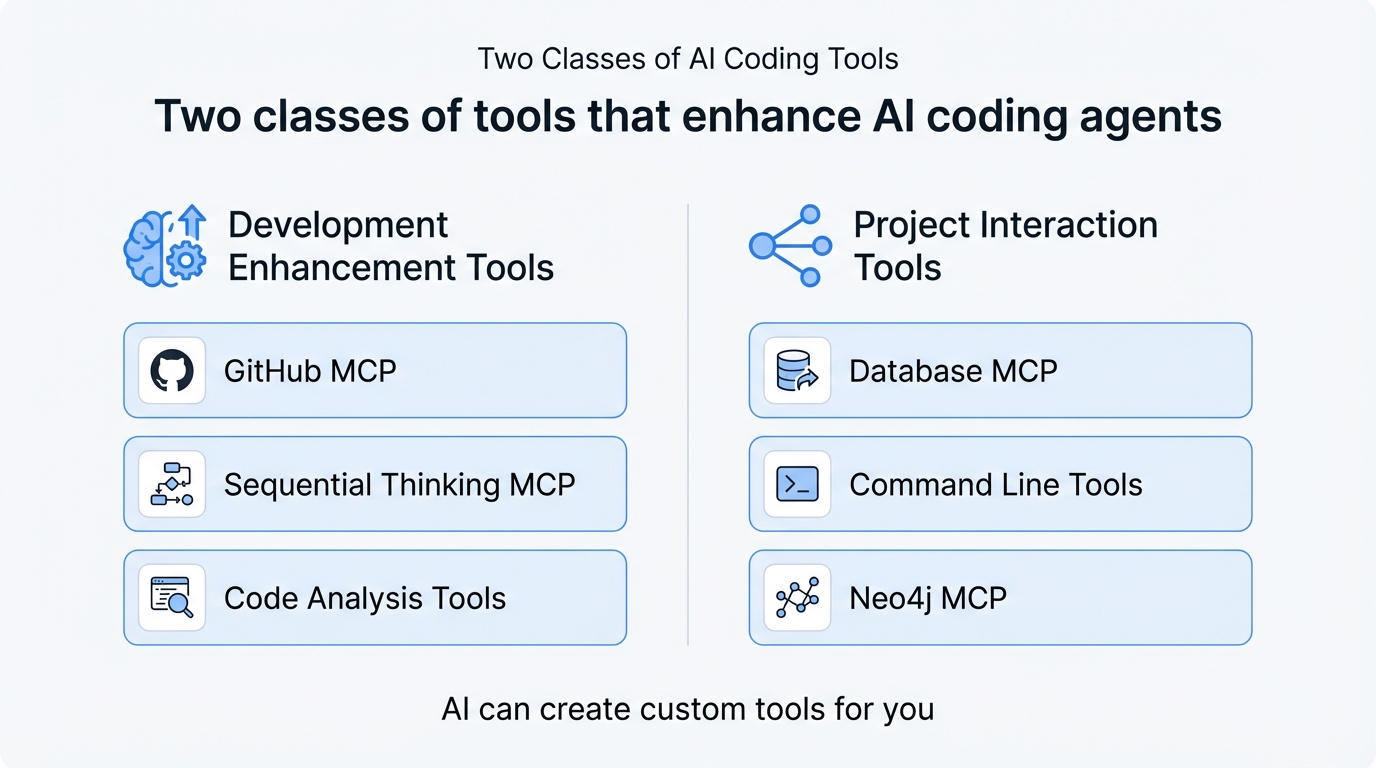 Two classes of tools that enhance AI coding agents
First are tools designed to enhance software development. Think of GitHub’s MCP or Anthropic’s Sequential Thinking MCP; these tools generally make coding agents more capable.
Second are tools that interact with the project. For example, a database MCP or a command line tool. These tools give coding agents the ability to write code, run it, and test the results, completing a full feedback cycle.
The brilliant thing about AI is that if you need a tool and there isn’t one, AI can create it for you.
Here are the tools I use with Cursor:
The first tool is called Serena. Serena attempts to offload tasks like reading files and saving data to memory that would normally have AI generate commands to execute the operation. The goal of this project is to reduce the number of tokens used and keep common operations local.
The next tool I use is called Sequential Thinking by Anthropic. If it’s by Anthropic, it’s almost guaranteed to be good. What this tool does is break down complex problems into manageable steps. It adds dynamic and reflective problem-solving through a structured thinking process.
Give it a try, I’ve put the link in the description.
The last tool I use is project-specific; it’s called Neo4j MCP, and AI created it. It’s been invaluable in working with Neo4j. Before, AI would ask me to run queries and then paste the results into the chat. This became cumbersome very quickly. With the tool, AI runs its own queries, and no human intervention is needed.
It’s beautiful, and it’s quicker. If you find friction in your development process, ask AI to help; you might be surprised what comes up.
In Closing
Let’s be honest here, working with Coding Agents feels a lot like pairing with a brilliant junior programmer who occasionally forgets everything we just told them. These 12 strategies are how I manage this relationship. And they might not work for everyone, or you, and that’s ok. Find what works for you. So my question to you is: What’s working for you? Drop a comment below and let me know.
Author: Chuck Conway is an AI Engineer with nearly 30 years of software engineering experience. He builds practical AI systems—content pipelines, infrastructure agents, and tools that solve real problems—and shares what he’s learning along the way. Connect with him on social media: X (@chuckconway) or visit him on YouTube and on SubStack.